
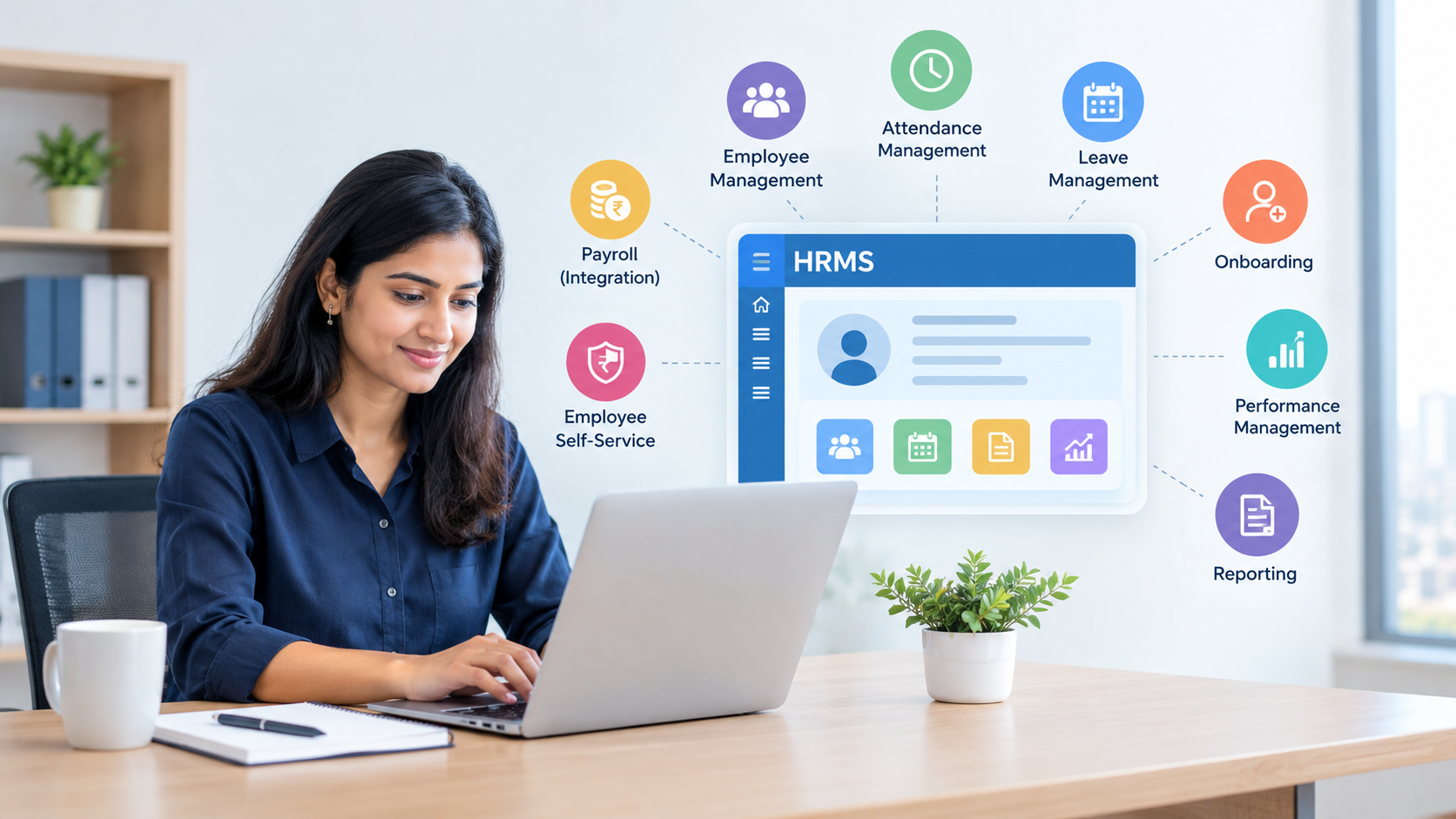
Managing employees involves much more than hiring and payroll. HR teams also handle attendance, leave, employee records, onboarding, performance, documents, compliance-related information and everyday employee requests. When these activities are managed through spreadsheets, emails and disconnected tools, HR work can become repetitive and difficult to track.
This is where HRMS software can help.
An HRMS, or Human Resource Management System, brings important HR processes into a central digital platform. Instead of maintaining employee information across multiple files and systems, businesses can organise HR operations through a structured workflow.
For Indian businesses, HRMS software can be particularly useful as companies grow, teams become distributed and HR processes become more complex. This guide explains what HRMS software is, how it works, its key features, benefits and what businesses should consider before adopting one.
What is HRMS software?
HRMS software is a digital system that helps businesses manage employee information and automate important human resource processes from a central platform.
HRMS stands for Human Resource Management System. Depending on the software, it may cover employee records, attendance, leave management, payroll-related processes, recruitment, onboarding, performance management, employee self-service and HR reporting.
Traditional HR administration often depends on spreadsheets, email communication and manually maintained documents. An HRMS can bring these processes together so HR teams can access information more systematically.
For example, instead of manually checking multiple spreadsheets to determine an employee's leave balance, an HRMS can maintain the relevant information within the employee's profile and workflow.
Why do Indian businesses need HRMS software?
Indian businesses use HRMS software to organise employee information, reduce repetitive HR administration and create more consistent HR workflows as their workforce grows.
A small business may initially manage employee records using spreadsheets. However, as the number of employees increases, manual administration can become time-consuming.
HR teams may need to manage:
- Employee personal and professional information
- Attendance and working hours
- Leave requests and approvals
- Employee onboarding
- Payroll-related information
- Documents and records
- Performance reviews
- HR reports
- Employee communication
- Internal approvals
When these activities are handled separately, information can become difficult to find and update.
HRMS software provides a centralised approach. It can help HR teams reduce repetitive data entry and create defined workflows for common processes.
For businesses already exploring digital business management, it can also be useful to understand how CRM software for small businesses in India can support customer and business operations alongside HR processes.
How does HRMS software work?
HRMS software works by storing employee information in a central system and connecting that information with HR workflows such as attendance, leave, onboarding, approvals and reporting.
A typical HRMS begins with an employee database. Each employee can have a digital profile containing relevant information such as their department, designation, joining date and other authorised records.
The system can then connect this information with different HR processes.
For example:
- An employee submits a leave request.
- The request is routed to the appropriate manager.
- The manager reviews and approves or rejects it.
- The employee receives the relevant status.
- HR can access the updated leave information.
- Reports can be generated from the stored data.
The exact workflow depends on the HRMS platform and the organisation's configuration.
What are the key features of HRMS software?
The main HRMS features typically include employee management, attendance, leave management, onboarding, payroll-related workflows, performance management, reporting and employee self-service.
1. Employee information management
An HRMS can maintain employee information in a centralised database. This gives authorised HR personnel a structured way to find and update employee records.
Instead of searching through multiple spreadsheets or folders, HR teams can access information through employee profiles.
2. Attendance management
Attendance management helps organisations record employee working patterns and attendance information.
Depending on the system, businesses may be able to manage attendance records, working hours, shifts and related approvals digitally.
This can reduce the need for manually maintained attendance sheets.
3. Leave management
Leave management is another common HRMS function.
Employees can submit leave requests digitally, while managers can review requests through an approval workflow. HR teams can then maintain records without manually updating separate spreadsheets.
4. Employee onboarding
HRMS software can help organise onboarding activities for new employees.
A structured onboarding workflow can include employee information collection, document submission, task assignment and approval steps.
This helps HR teams create a consistent onboarding process instead of managing every new employee through separate email threads.
5. Payroll-related information
Some HRMS platforms include payroll functionality, while others integrate with dedicated payroll systems.
The HRMS can help maintain employee information and attendance or leave data that may be relevant to payroll processing.
Businesses should check the exact payroll capabilities and integrations offered by the HRMS they are evaluating.
6. Performance management
Performance management features can help organisations structure employee reviews, goals, feedback and related documentation.
Instead of relying entirely on manually maintained documents, managers and HR teams can manage relevant information through a central system.
7. Employee self-service
Employee self-service allows employees to complete certain HR activities without depending on HR for every request.
Depending on the platform, employees may be able to view their information, submit leave requests, access documents or complete assigned HR tasks.
This can reduce routine administrative requests handled directly by HR teams.
8. HR reporting
HR reports can help management understand workforce-related information.
Businesses may use reports to review attendance, employee numbers, leave patterns, departmental information and other HR metrics supported by the platform.
How can HRMS software reduce repetitive HR work?
HRMS software reduces repetitive HR work by automating routine data entry, approvals, notifications, record updates and recurring HR workflows.
Consider a leave approval process.
Without an HRMS, an employee may send an email to their manager, the manager may respond, and HR may then update a spreadsheet manually.
With a digital workflow, the employee can submit the request through the system. The request can be routed to the relevant approver, and the resulting status can be recorded centrally.
The same principle can apply to onboarding, attendance-related processes and employee information updates.
Automation does not remove the need for HR professionals. Instead, it can shift HR effort away from repetitive administration toward activities that require human judgement and communication.
What are the benefits of HRMS software for growing businesses?
The major benefits of HRMS software include centralised employee information, reduced manual administration, structured approvals, better visibility and more consistent HR processes.
Centralised employee records
HR teams can maintain employee information in one system instead of distributing it across multiple files.
Less manual administration
Automated workflows can reduce repetitive activities such as updating records and following up on routine approvals.
Faster HR processes
Digital requests and approval workflows can make routine HR processes easier to track.
Better visibility
Managers and authorised HR users can access relevant information without relying on multiple disconnected files.
Improved employee experience
Employees can complete routine HR tasks digitally instead of contacting HR for every basic request.
Easier reporting
Centralised information can make it easier to generate reports and identify workforce-related trends.
Is HRMS software useful for small businesses?
Yes, HRMS software can be useful for small businesses when employee administration is becoming difficult to manage manually.
Small businesses may not initially need a complex HR platform. However, even a growing organisation can benefit from structured employee records and standardised workflows.
The important consideration is choosing software that matches the organisation's size and requirements.
A business should evaluate whether it needs features such as attendance, leave management, employee self-service, onboarding, payroll integration, performance management or reporting.
Starting with the most important requirements can prevent businesses from paying for unnecessary functionality.
What should businesses consider before choosing HRMS software?
Businesses should evaluate HRMS software based on features, ease of use, scalability, integrations, security, reporting, support and total cost.
Before selecting a platform, consider the following:
Business requirements
Identify the HR processes that currently consume the most time.
Ease of use
An HRMS should be understandable for both HR teams and employees. Complicated workflows can reduce adoption.
Scalability
Choose a system that can support increasing employee numbers and changing organisational requirements.
Integrations
Check whether the HRMS can integrate with payroll, attendance systems, accounting platforms or other tools your organisation already uses.
Security and access controls
Employee information can contain sensitive personal data. Businesses should understand how the software handles access permissions, storage and data protection.
India's Digital Personal Data Protection Act, 2023 establishes a legal framework concerning the processing of digital personal data. Businesses should therefore consider their data protection responsibilities when selecting and configuring HR technology.
Reporting capabilities
Check whether the system can provide the HR reports and workforce insights your management team actually needs.
Customer support
Reliable support can be important during implementation, employee onboarding and troubleshooting.
What is the difference between HRMS and traditional HR management?
Traditional HR management often relies on spreadsheets, documents, emails and separate systems, while HRMS software centralises HR information and workflows within a digital platform.
Manual systems can work for very small teams, but they can become difficult to maintain as the organisation grows.
An HRMS introduces structured processes. Instead of maintaining separate documents for every HR activity, businesses can manage multiple processes through a connected system.
This can improve consistency and make information easier to access for authorised users.
How can HRMS software support employee self-service?
HRMS software supports employee self-service by allowing employees to complete routine HR activities directly through the system.
For example, employees may be able to:
- Submit leave requests
- Check leave information
- Update selected personal details
- Access HR documents
- Complete onboarding tasks
- View assigned HR activities
The exact capabilities depend on the HRMS platform.
Employee self-service can reduce the number of routine requests reaching HR teams and give employees greater visibility into their own HR processes.
Is HRMS software only for large companies?
No. HRMS software can be used by organisations of different sizes, provided the selected platform matches their workforce size, processes and budget.
Large enterprises may require extensive HR functionality and integrations, while smaller businesses may primarily need employee records, attendance, leave and basic workflow automation.
The key is to avoid selecting software based only on the number of features. Businesses should focus on the HR processes they actually need to manage.
What does the future of HRMS software look like?
HRMS platforms are increasingly becoming part of broader business technology ecosystems.
Businesses are looking for systems that can connect employee information with other operational processes instead of maintaining isolated applications.
Automation, employee self-service, reporting, integrations and cloud-based access are likely to remain important areas of HR technology.
For growing Indian businesses, the objective should not simply be to replace spreadsheets with another digital tool. The bigger opportunity is to create consistent, trackable and scalable HR workflows.
Conclusion
HRMS software provides businesses with a structured way to manage employee information and HR processes digitally. From attendance and leave management to onboarding, employee self-service and reporting, an HRMS can bring multiple activities into a central system.
For Indian businesses, the right solution depends on workforce size, operational requirements, existing software, integrations and data management needs.
Businesses considering HR automation should first identify their most repetitive HR processes and then evaluate software based on those specific requirements. A practical HRMS implementation can help create more organised workflows while giving HR teams more time to focus on employees and business priorities.
Frequently Asked Questions
What does HRMS stand for?
HRMS stands for Human Resource Management System. It is software used to manage employee information and various HR processes digitally.
What is HRMS software used for?
HRMS software is used for activities such as employee records, attendance, leave management, onboarding, employee self-service, performance management, reporting and other HR workflows.
Can small businesses use HRMS software?
Yes. Small businesses can use HRMS software to organise employee records and automate routine HR processes as their workforce grows.
Does HRMS software include payroll?
Some HRMS platforms include payroll functionality, while others integrate with dedicated payroll systems. Businesses should check the specific features of each platform.